Virtual Deal Room: Buy-Side vs Sell-Side M&A Guide

Last quarter, a client called me — sell-side advisor on a $180M SaaS deal out of Amsterdam — three days before signing. The buyer’s technical team had just flagged seventeen vendor security agreements that weren’t in the room. They existed. Nobody organized them correctly from day one.
That’s the virtual deal room problem. Not access, not permissions — organization.
SRS Acquiom’s 2026 M&A study made it official: 51% of respondents now call technology review the single most burdensome part of the entire process. Not financial diligence. Not legal. Tech. When the heaviest lift shifts to source code repositories, cloud architecture diagrams, and vendor security assessments, you need a room that helps you find the right documents before the other side does.
Here’s how to build one — buy side or sell side.
What Is a Virtual Deal Room?
A virtual deal room — same thing as a virtual data room, or VDR — is a secure, cloud-based environment where parties to a transaction share and review confidential documents. It’s not Dropbox. It’s not SharePoint. Purpose-built for deals: granular permissions, full audit trails, Q&A workflows, and document controls that prevent screenshots or downloads depending on what you allow.
Law firms use them to run sell-side M&A. Investment banks use them to manage buyer access in competitive auctions. PE firms use them for portfolio company diligence. Startups use them when sharing financials with twelve investors across four time zones at 11pm on a Tuesday.
Most legacy VDRs are just glorified Dropbox folders. Sorry, but it’s true. And the deals that collapse in final diligence? Half the time it’s a process problem, not a document problem.
Buy-Side vs Sell-Side: Different Jobs, Same Room
Here’s what most guides miss.
On the sell side, you control the room. You built it, you populate it, you decide who sees what and when. Your goal: present the company completely enough that buyers can’t claim surprise post-close, without handing away your negotiating position early. Most sellers get this wrong — over-sharing in Phase 1, under-organizing throughout.
A sell-side room typically stages access two ways:
- Phase 1 (MIP + teasers): All qualified bidders. Light detail. No trade secrets, no customer-level data.
- Phase 2 (Full diligence): Three to five shortlisted parties only — contracts, HR records, IP filings, detailed financials. Everything.
On the buy side, you’re a guest in someone else’s room — but a demanding one. Your job is to find what’s missing as much as what’s there. A gap in the data room is itself a signal. Where are the customer contracts? Why are there no employment agreements for the senior engineering team? Buy-side teams at a Chicago PE firm closing a $200M carve-out don’t read documents linearly. They work backwards from risk hypotheses. The data room is their evidence kit.
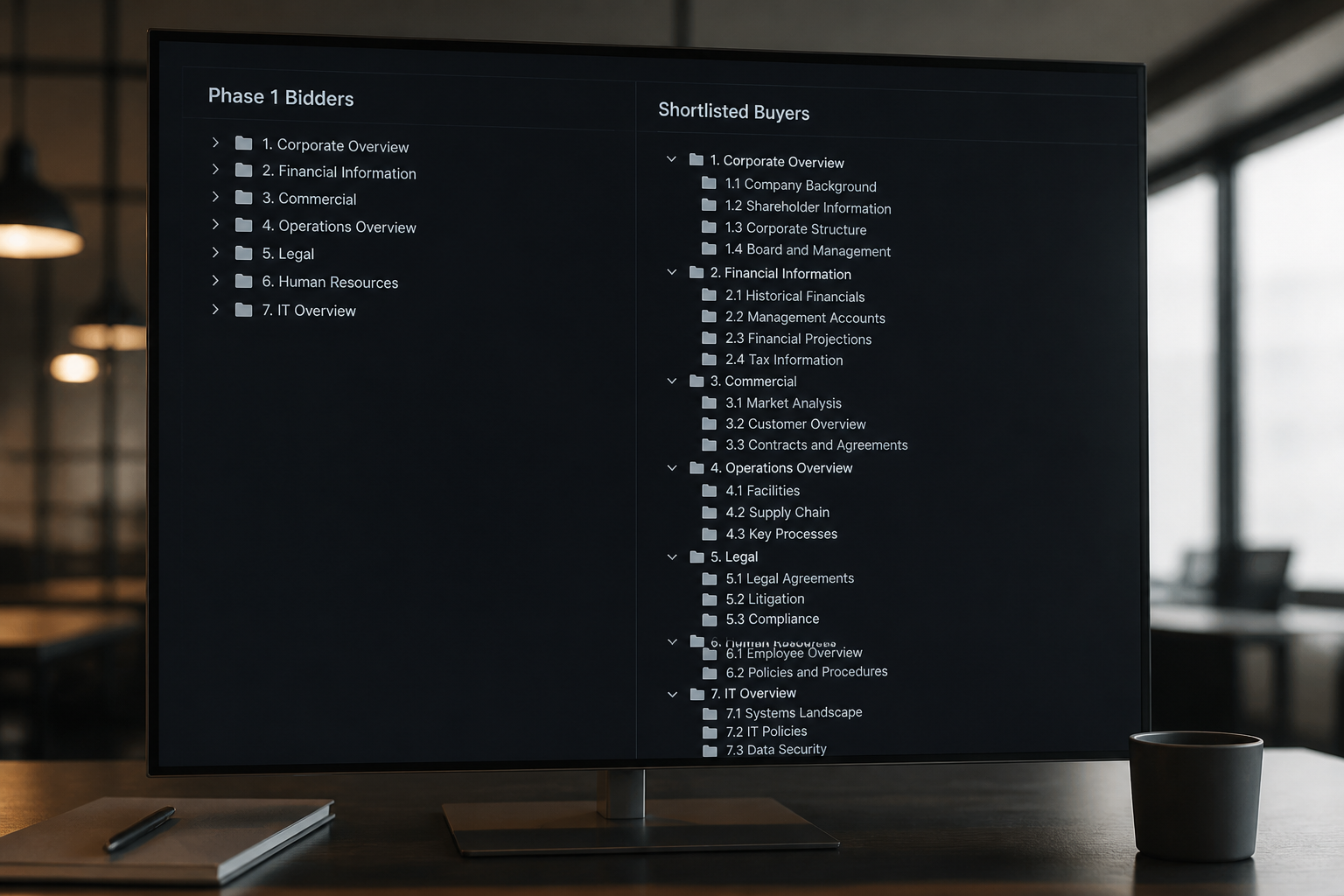
Folder Structure That Actually Works for Due Diligence
Most sellers upload documents in whatever order they found them. I’ve seen it derail auction processes — it costs weeks, and in a competitive situation, weeks cost you bidders.
A clean data room for M&A organizes by diligence workstream, not internal department logic:
- 01 – Corporate & Governance — Certificate of incorporation, bylaws, board minutes, cap table
- 02 – Financial Statements — Audited financials (three years minimum), management accounts, projections, working capital analysis
- 03 – Contracts & Commercial — Customer agreements, supplier contracts, NDAs, side letters
- 04 – Intellectual Property — Patents, trademarks, software licenses, open-source inventory
- 05 – Human Resources — Org charts, employment agreements, equity plans, benefits
- 06 – Legal & Regulatory — Litigation history, regulatory filings, permits
- 07 – Technology & IT — Architecture diagrams, security audits, vendor agreements, SLAs
- 08 – Real Estate — Leases, property assessments
- 09 – Tax — Returns, transfer pricing docs, elections
That technology section used to be the last thing anyone thought about. Given the 2026 data, it now often runs as its own parallel workstream — sometimes with a separate secure environment just for technical reviewers. Plan for it from day one.
Staged Access and Q&A Workflow
Staged access is the operational core of any auction. Done right, it controls competitive tension. Done wrong — and I see this constantly — you leak your negotiating position or let unqualified buyers waste management time during site visits.
The mechanics: create permission groups that mirror your deal timeline. Group A sees Phase 1. Group B sees Phase 2. Group C (exclusivity) sees everything — data tape, systems access, customer-level detail.
Q&A workflow is just as critical. When buy-side counsel at a London law firm running cross-border diligence asks for all amendments to a Master Services Agreement with Client X — that question needs to go through the deal room’s Q&A module, get assigned to the right workstream lead, and come back with a document link. Not an email. Not an attachment that bypasses your audit trail and lands in someone’s inbox at 2am. Legacy platforms handle this badly. Most were built like it’s 2010, and it shows when you’re managing forty buyer questions a day in week three of a process.
Red-Flag Documents Diligence Teams Look For
Experienced buy-side teams aren’t just reading documents. They’re doing pattern recognition. Here’s what makes them pause:
- Change of control provisions in customer contracts that let customers exit at acquisition — a $12M ARR contract walking out the door post-close will wreck your model
- Undisclosed related-party transactions buried in financial footnotes
- IP ownership gaps — work product created by contractors without proper assignment agreements. This comes up constantly in tech deals.
- Regulatory correspondence that doesn’t appear in the litigation section
- Equity plan discrepancies between the cap table and individual grant agreements
The best advisors catch these manually. But when you’re reviewing 1,400 documents on a $200M carve-out with a three-week timeline, manual review has hard limits. The clock never stops…

Where AI Classification Actually Earns Its Keep
This is where a modern AI virtual data room separates from legacy platforms like Intralinks and Datasite — which haven’t meaningfully changed their core architecture in years.
SmartVDR’s AI classification engine reads documents as they’re uploaded and does three things immediately: categorizes them into the correct folder — so your financial advisor isn’t spending day one reorganizing a chaotic upload — flags anomalies like unusual termination clauses or financial figures that don’t reconcile with projections, and identifies missing document types based on deal category.
That last feature matters most. “Your technology section is missing vendor security agreements” — surfaced before the first buyer logs in, not three days before signing — prevents exactly the kind of panic I described at the top. A week of late-stage back-and-forth, gone.
And for a Series B startup sharing financials with twelve investors for the first time? SmartVDR’s setup time is measured in hours, not days. The AI organizes what you upload instead of waiting for you to sort it manually. That’s the difference between a secure data room that’s a file cabinet and one that actively works the deal.
Frequently Asked Questions
What is a virtual deal room and how does it differ from a regular data room?
A virtual deal room and a virtual data room refer to the same thing — a secure online environment for sharing confidential documents during a transaction. “Virtual deal room” just signals intent: it’s purpose-built for running live M&A, fundraising, or legal transactions, not general file storage. Key features include granular permissions, audit trails, Q&A workflows, and document controls you won’t find in generic cloud tools.
How should I structure a virtual data room for an M&A sell-side process?
Organize folders by diligence workstream — corporate/governance, financials, contracts, IP, HR, legal/regulatory, technology, real estate, and tax — using numbered prefixes to control display order. Stage access by bidder group: Phase 1 for all qualified buyers, Phase 2 for shortlisted parties after management presentations. Keep the technology section current; in 2026 it generates more buyer questions than any other workstream.
What documents do buy-side due diligence teams prioritize in a deal room?
Experienced acquirers go straight to customer contracts (change of control clauses first), the cap table, the litigation schedule, and any regulatory correspondence. In 2026, technology and cybersecurity diligence has become the most burdensome element for most deal teams — so IP ownership records and vendor security agreements now get scrutinized as heavily as audited financials.
How long does it take to set up a virtual deal room for M&A?
With legacy platforms, a properly structured deal room takes three to five days once documents are gathered. With SmartVDR’s AI-powered classification, it happens in hours — the system reads and categorizes uploads automatically, flags what’s missing, and surfaces anomalies before your first buyer even logs in.
Ready to run your next deal on a smarter data room? Visit SmartVDR.com to see how AI-powered document intelligence can close your deals faster.